Trident. The app that supports your climb from start to finish.

Let’s take a look at a story that’s common to every organization and familiar to nearly everyone who works in one.
Almost every day, ideas and thoughts float around our workday. They may begin in a meeting, during a quick discussion, or even in those informal moments while chatting with colleagues. Every time these ideas are discussed, there’s usually a burst of energy. People who love the idea, others building on the idea, suggestions flying, and excitement all around.
But what happens after all that?
Great brainstorming session? Check.
Strong ideas? Check.
Actual progress? Not so much.
If those ideas aren’t picked up and worked on, they’ll just remain ideas and eventually fade with time. That’s the moment you realize that brainstorming was only the first step. The real challenge is everything that comes after that. We like to call that part The Climb (often referred to as the grind). It’s the stretch between start and finish, where progress can stall if teams are overwhelmed or unclear about what comes next.
Trident powers the climb.
Most tools are designed to solve specific problems, whether it’s communication, tracking tasks, or managing calendars. While each of these tools are helpful on their own, very few bring everything together in one place. Trident does, and it goes even further. Well known for its unified communication platform, Trident is also an integrated work hub that carries ideas through execution. With modules like Calendar, Tasks, Notes as well as well-integrated app widgets like Zoho CRM, Desk, WorkDrive, and other smart features, Trident keeps work moving and supports every step of the climb until the idea becomes reality.
In this blog post, we’ll walk through everyday challenges and show you how Trident keeps your work flowing smoothly without slowing you down.
Hold onto your plan through the busy moments.
One of the easiest places to get stuck during the climb is when the things you plan to get done slowly start slipping your mind. Our workday fills up fast with messages, requests, meetings, discussions, and the unexpected things that find their way in.
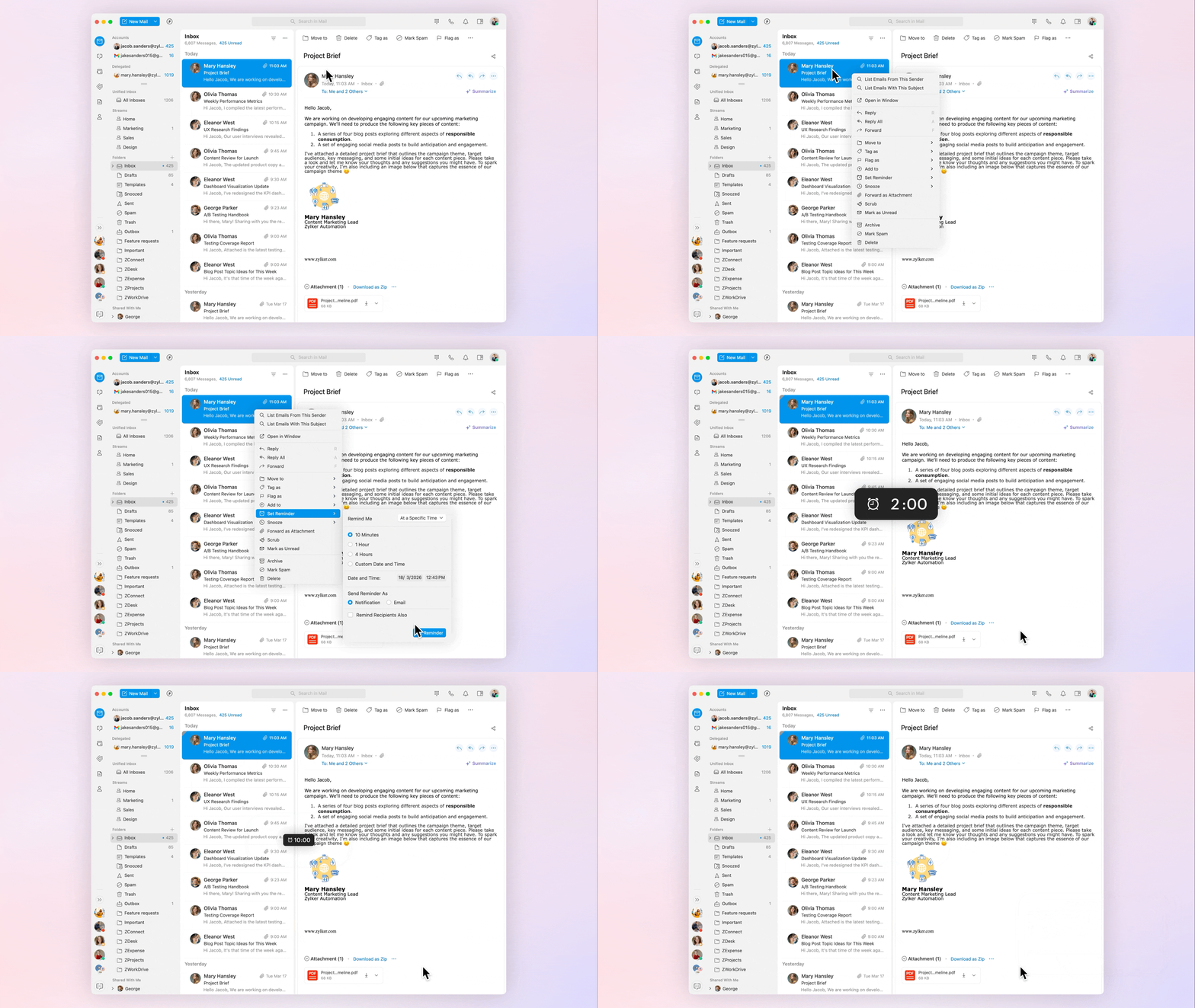
Here’s where reminders become your safety net. Trident helps you stay on track by letting you set reminders for emails, chats, events, and other important items, and choose how and when they show up in your day. If you’re someone who stays closely connected to your inbox, you can receive reminders as emails right where you already manage your work when you’re on the go. For less-urgent reminders, quick in-app notifications give you that gentle push without breaking your focus.
When something truly cannot be forgotten, there are sticky notifications. A sticky notification stays visible on your screen no matter what you’re working on. It doesn’t get buried in the background. It stays on your screen until you take action, making it much harder for important work to quietly slip away. It’s a simple but powerful way to stay focused without relying on memory alone.
Let’s say you receive an email that needs a response, but you’re busy. You can add a reminder and come back to it later. The same applies in chats. Many tasks depend on someone else taking the next step, and a lot of time is often spent circling back for updates. Unlike personal reminders that notify only you, chat reminders can be set to notify everyone in the conversation, saving you from having to chase updates yourself.
One place for everything you need to stay updated.
Another reason progress slows down is scattered information. Your chats live in one app. Emails live somewhere else. Tasks are tucked away in another place. Then reminders and notifications pop up from different directions. It’s a lot to juggle, and when your attention keeps shifting across apps, it becomes harder to make consistent progress.
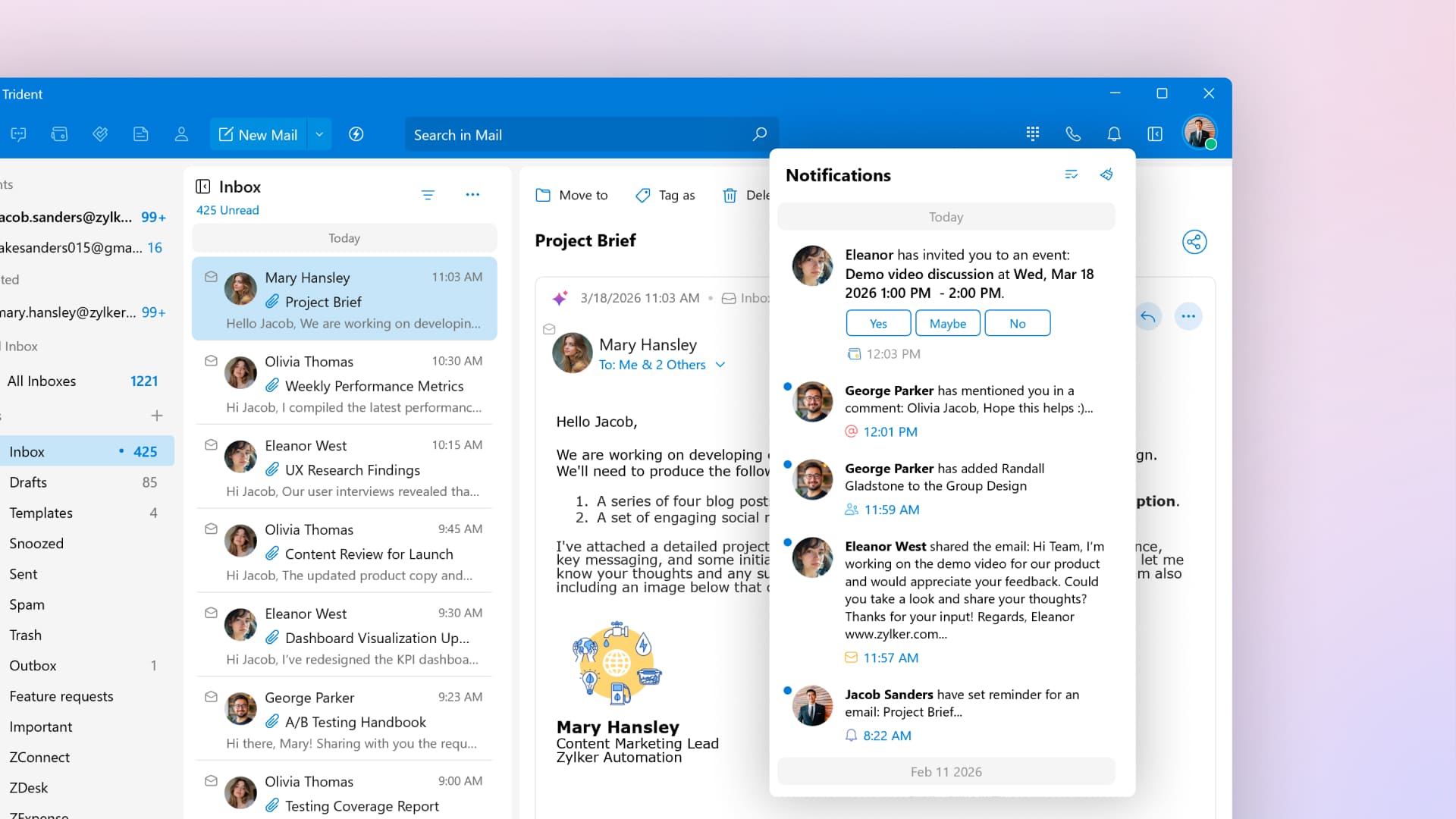
In Trident, every notification you need comes together in one place. Whether it’s an updated meeting time, someone being added to a group, an email shared with you, or a task assigned to you, everything appears clearly, without having to adjust to different reminder interfaces across tools.
The best part is that these notifications are actionable. A single click gives you the full context, and you can respond or take action right away. You may not notice the seconds you save each time, but when everything comes together in one place, the difference in how smoothly your day runs is impossible to miss.
Make follow-ups faster and more effective.
Follow-ups are a natural part of work. But when something that needs your attention gets missed, even small delays can add up and slow down the flow. With Trident, nothing slips through.
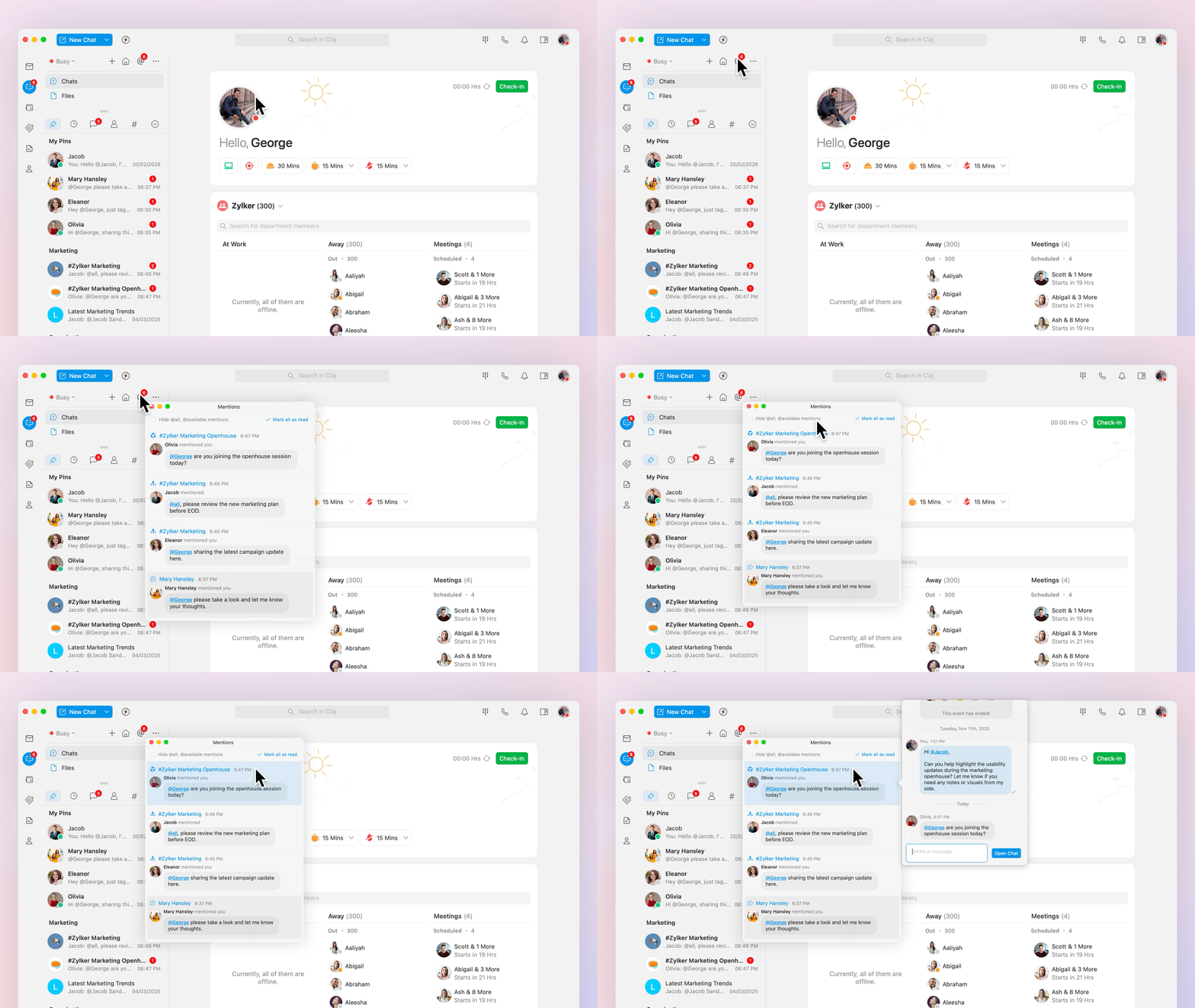
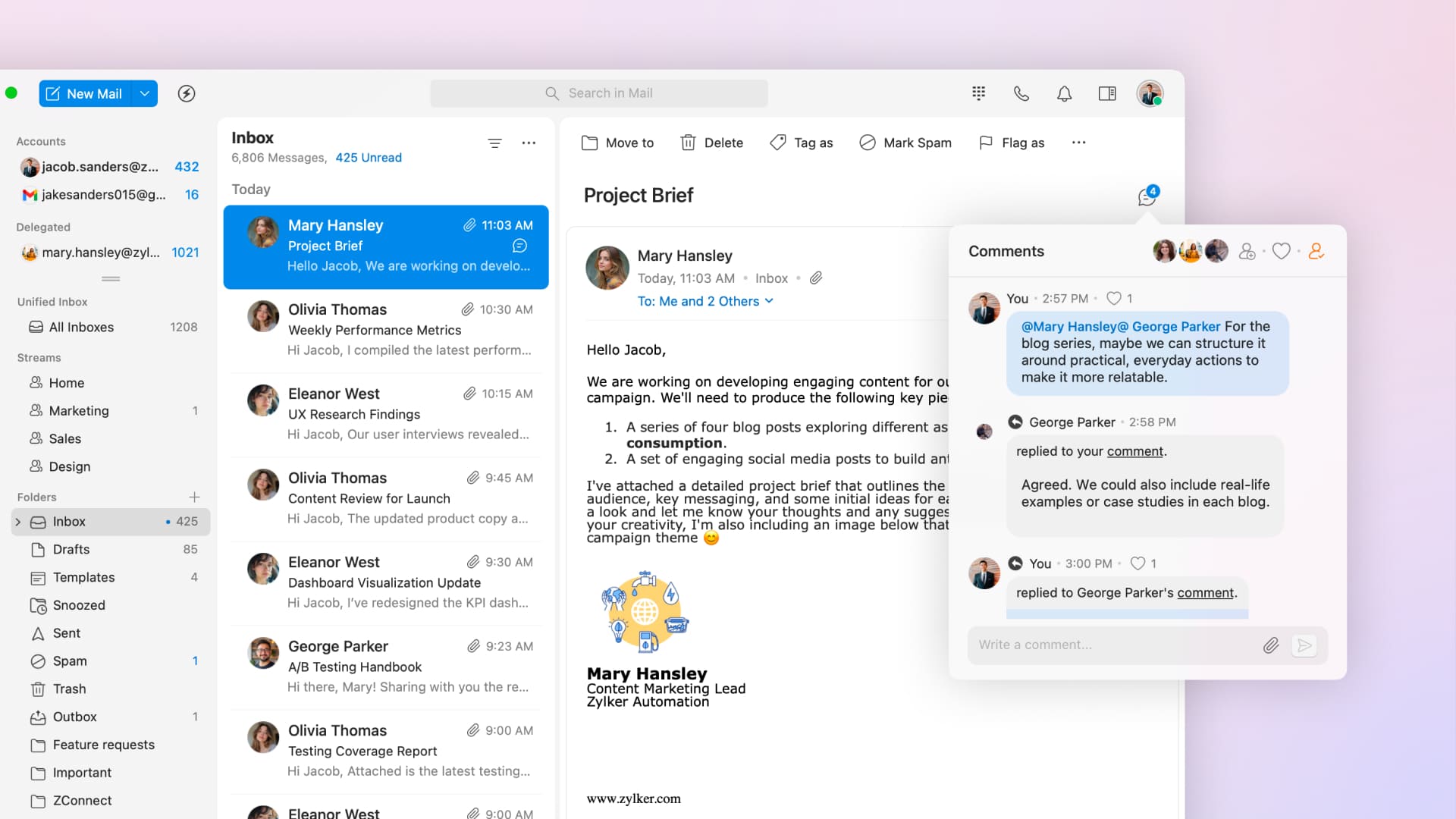
When you're deep in work, the last thing you want is to miss a message that needs a response. That's exactly what the @mentions view in Trident is for. Whenever someone mentions you in a chat, that message is automatically pulled into a dedicated view, separate from the regular flow of notifications. Everything that needs your attention is in one place. You can click the message, get the full context, and respond right away.
And when you need to move something forward, Trident makes that just as easy. Follow-ups get harder when decisions are buried in email threads and the people you need were never part of the original conversation. This is where Streams comes in. Streams is a unique Zoho Mail feature in Trident that brings social media-style communication to your mailbox. By @mentioning, you can share an email with a person or a group. Everyone you mention can see the full email thread and discuss it together in a dedicated space.
This helps when you need to:
Get quick input from teammates before replying.
Loop in someone who wasn’t part of the original email.
Review or decide on an email together before taking action.
All discussions stay in one place, everyone sees the same context, and decisions are made faster.
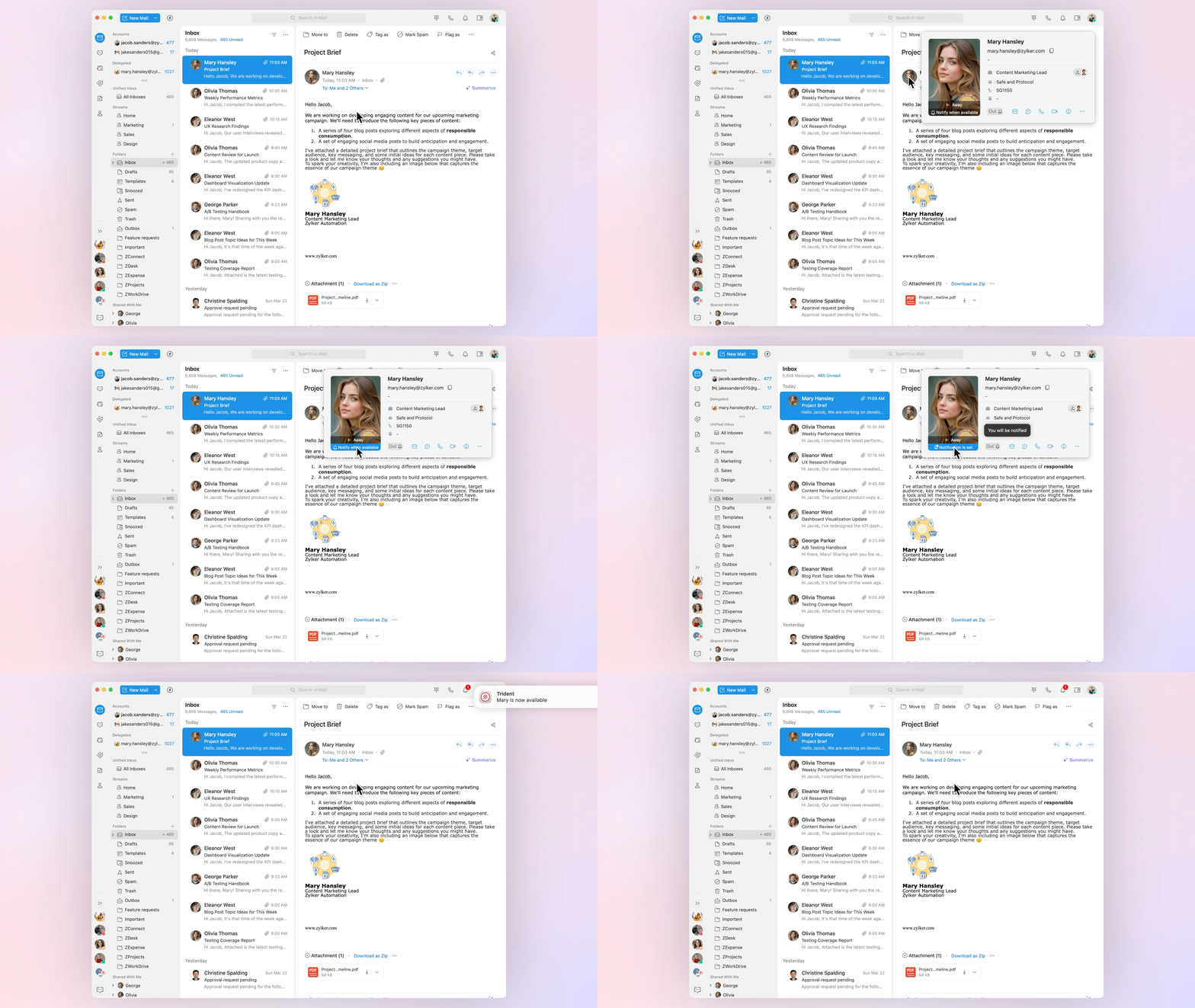
If you’re trying to follow up with someone who’s offline or yet to check in, the Notify When Available option is incredibly useful. With a single click, Trident alerts you the moment they come online so you can follow up, send a message, or jump into a call right away.
Onwards and upwards with Trident.
There’s always another project to complete or another challenge waiting for its turn. Staying the course on what you’ve set out to do is often the most important—and the hardest—part of the climb. Trident makes that path easier by helping you keep your plans organized and follow through at the right time so the work actually moves things forward.
Trident is available for all paid and evaluating users of Zoho Mail, Zoho Workplace, and Zoho One (with an active Zoho Mail account) at no extra cost.

Comments