Reimagining customer support for an automation machinery manufacturing company with Zoho Desk
The company
Founded in 2014, the company has grown from a 12-person machine shop into a full-scale industrial automation partner serving more than 180 manufacturing clients across the automotive, aerospace, packaging, and electronics sectors. Its 45,000-square-foot production and integration facility brings together CNC machining, robotics assembly, and IoT capabilities under one roof.
The company designs, builds, and deploys precision CNC-machined components, custom robotic work cells, and IIoT-enabled monitoring platforms that give manufacturers greater visibility into machine uptime, production throughput, and predictive maintenance needs. With a team of 95 mechanical engineers, controls specialists, and software developers, the company has delivered more than 600 automation projects, helping manufacturers modernize their operations and improve productivity.
The company continues to invest in next-generation robotics and edge-AI technologies, strengthening its capabilities across intelligent automation and connected manufacturing.
The requirement
Since the company operates in the industrial automation space—offering CNC machinery, robotic automation, and associated products and parts—customer support involves more than just responding to routine queries. A customer interaction can begin with an inquiry about a product or part, progress through quotation and follow-up, and eventually become a technical support request after purchase.
For existing customers, support requests can involve issues with purchased machinery, components, or parts. Depending on the nature of the issue, the support team may need to troubleshoot the problem, provide technical assistance, determine whether a replacement is covered under warranty, arrange for a field technician to visit the customer, and follow up until the issue is resolved.
As these interactions move through different stages, they can also require coordination between multiple agents, teams, and departments. The company therefore needed a structured way to manage the complete customer support journey while improving visibility into how tickets move through the organization.
The company also wanted to make greater use of the advanced capabilities available in Zoho Desk Enterprise edition. The company was looking to strengthen process automation, understand ticket lifecycles in greater detail, improve operational reporting, and incorporate AI more extensively into customer support.
The objective was not simply to introduce more features, but to use Zoho Desk to bring greater structure and efficiency to the way the support operation works.
The solution
Centralizing inquiries and sales follow-ups
Zoho Desk serves as the central platform for managing customer inquiries related to CNC machines, robotic automation solutions, and IoT technologies. When a customer submits a new requirement, agents capture the details directly in Desk, generate the corresponding quotation, and coordinate all subsequent communications within the system. Consolidating these interactions into a single platform gives the team full visibility into every engagement, allowing them to track each request seamlessly from the initial inquiry through the final sales stage.
Streamlining post-sales and technical support
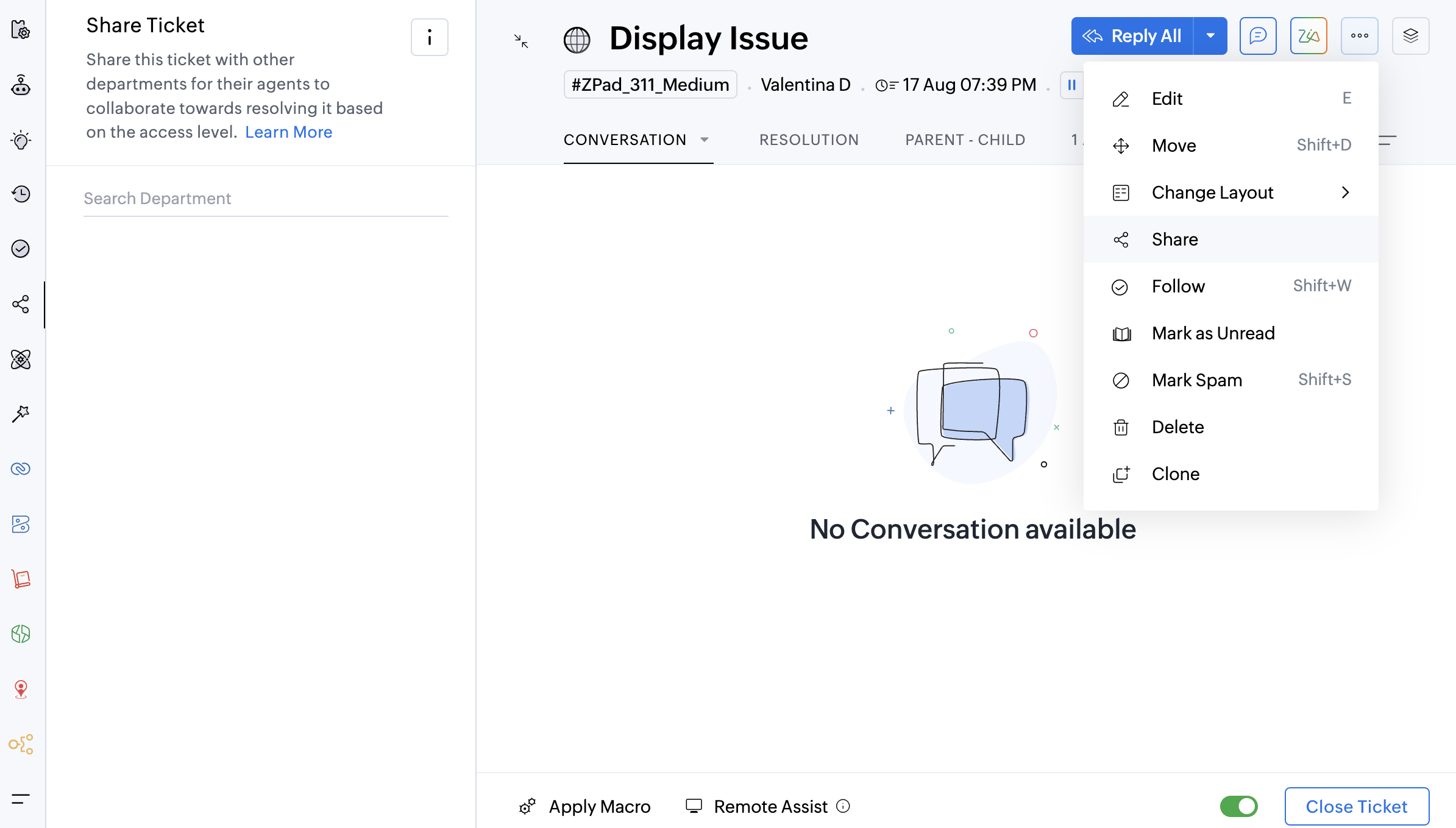
The platform also structures the company’s post-sales service and parts support. When customers report an issue, agents document the case, initiate troubleshooting, and log all technical assistance provided. Depending on the issue's severity and warranty status, resolutions may involve guided troubleshooting, replacement parts, or an on-site visit by a field technician. By keeping all cross-team handoffs, service activities, and follow-ups linked to the original ticket, Zoho Desk ensures complete continuity until the customer’s problem is fully resolved.
See how to share tickets across departments.
Improving visibility across the complete ticket lifecycle
As support requests become more complex, knowing that a ticket is open or closed is not always enough. The company wanted to understand what happens between those two points.
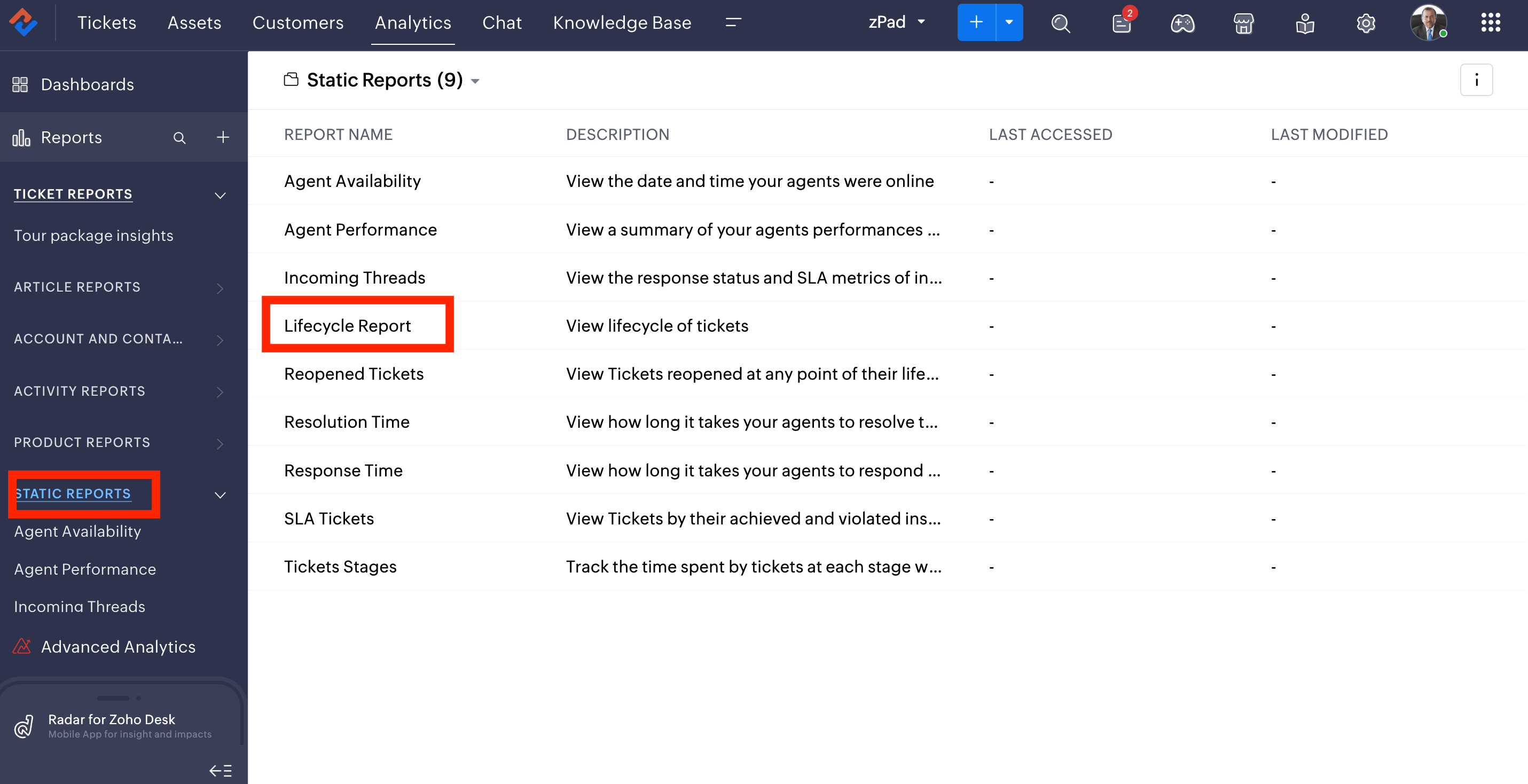
Zoho Desk's Lifecycle Reports provide visibility into how tickets transition between statuses, agents, teams, and departments. This allows the team to understand the complete movement of a customer request rather than looking at individual ticket stages in isolation.
For example, a technical issue may begin with a customer service agent, move to a technical team for troubleshooting, require input from another department, and eventually return to the customer service team for closure. Lifecycle Reports help provide visibility into these transitions and the time tickets spend at different stages.
This gives the management a clearer view of how customer requests move through its support operation and helps the team identify opportunities to improve handoffs, reduce delays, and streamline complex support journeys. The capability is particularly relevant to industrial automation support, where resolving an issue may require coordination between customer-facing teams, technical specialists, parts teams, and field personnel.
Check out the FAQ page on lifecycle reports
Automating repetitive support processes
The company has also strengthened its support operation through automation within Zoho Desk. Workflow automation, assignment rules, escalation mechanisms, and other automation capabilities can be used to trigger appropriate actions based on ticket conditions and stages. This helps reduce the amount of manual coordination required when tickets need to be assigned, updated, escalated, or followed up.
For instance, automation can help route requests to the appropriate team based on the nature of the issue, trigger actions when a ticket reaches a particular stage, or ensure that tickets requiring attention are surfaced at the appropriate time.
Learn about support ticket automation
By automating repetitive activities around the ticket lifecycle, the support team can spend more time addressing the underlying customer issue instead of manually managing every administrative step associated with it.
Strengthening operational reporting
With Zoho Desk's capabilities, the company has also gained greater scope to understand its support operation through reporting.
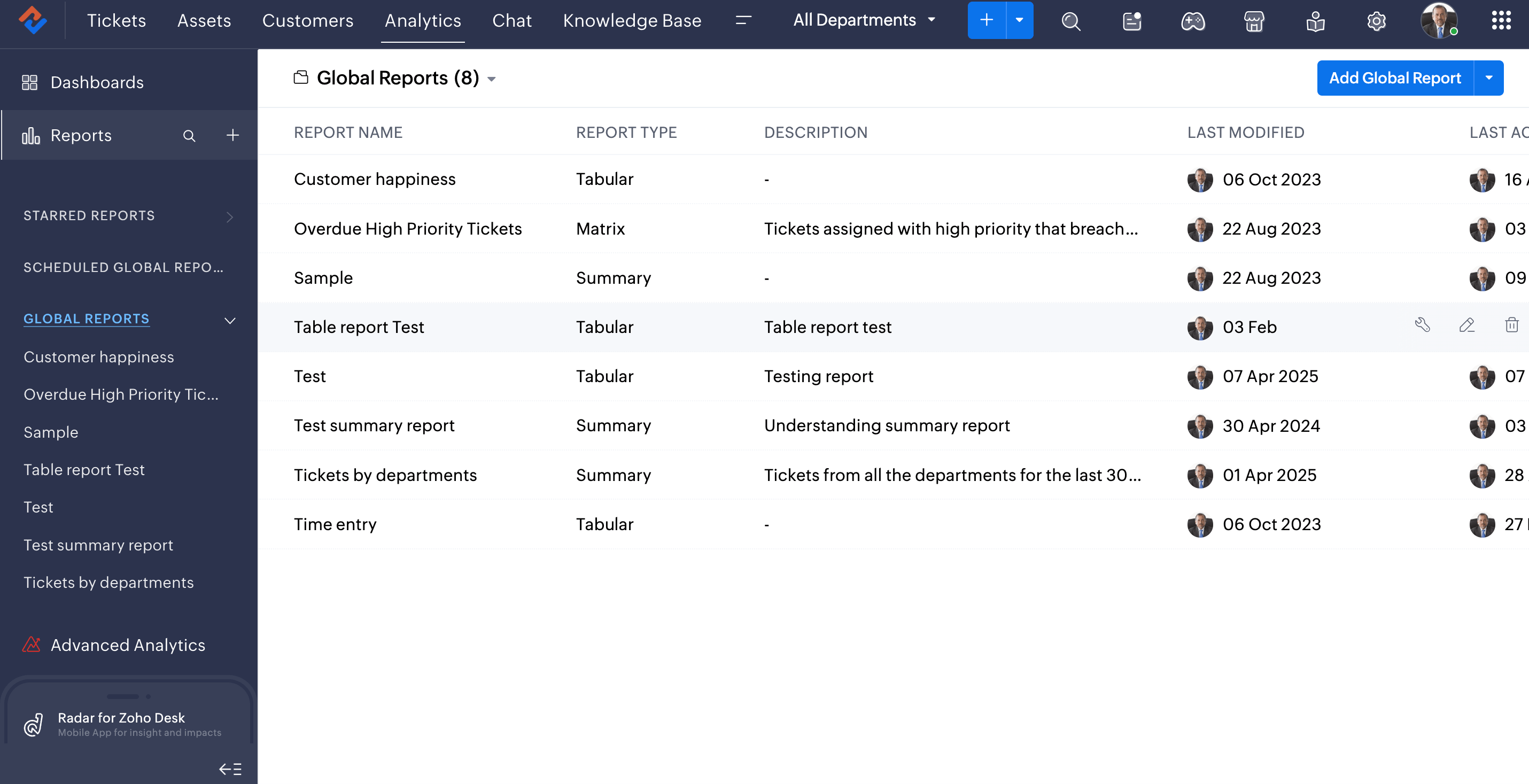
Instead of focusing only on the number of tickets received or closed, the team can now examine the broader lifecycle of customer requests, including response and resolution performance, ticket movement, SLA-related metrics, agent activity, and other operational indicators.
The reports and scheduled reporting capabilities in Zoho Desk allow the relevant stakeholders to receive support information at regular intervals, making operational reviews more consistent and reducing the need to manually compile recurring updates.
This provides management with a more structured view of customer support performance and helps the team identify trends and areas where processes can be improved.
Discover how to create global or cross-departmental reports
Bringing AI into customer support
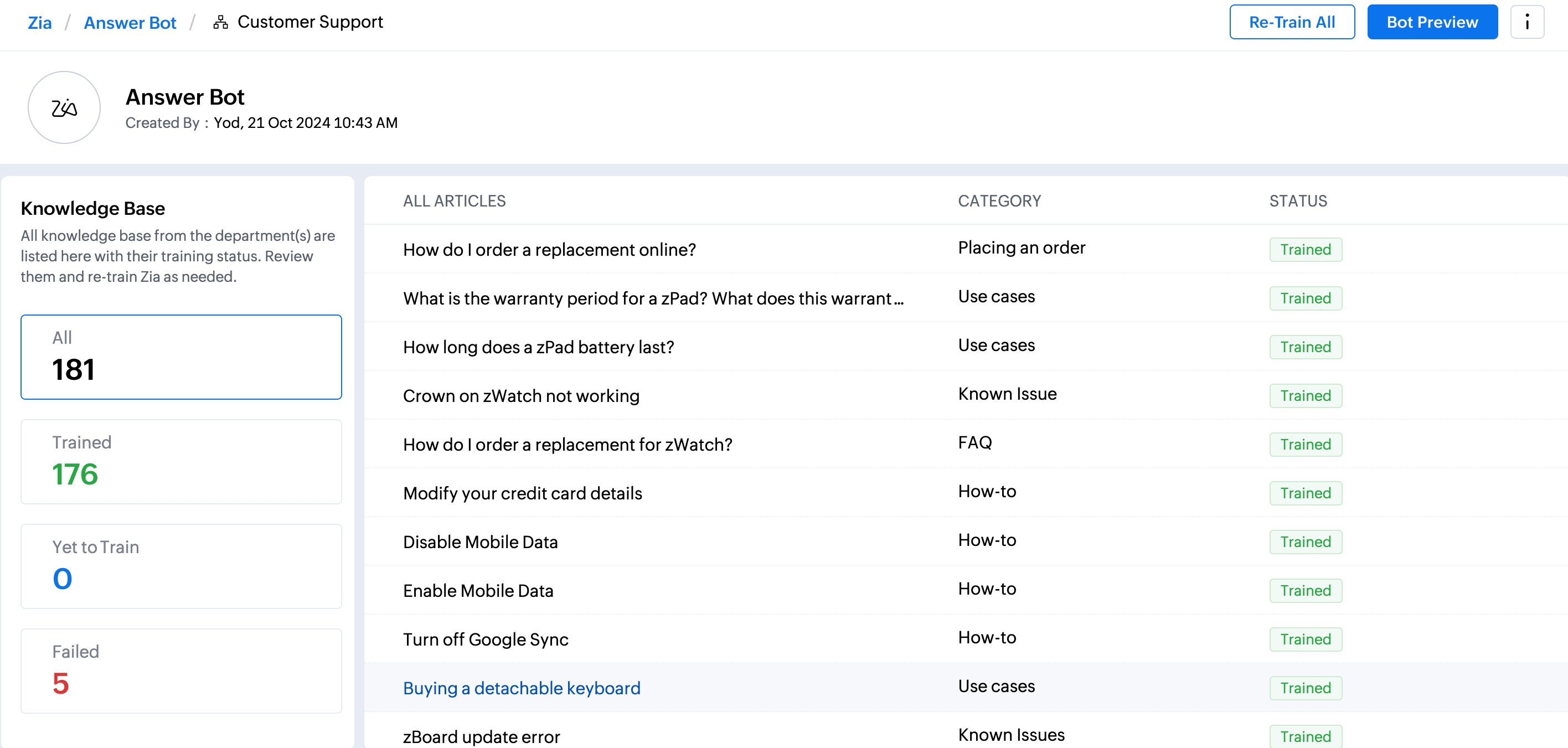
AI adoption is another important part of the company's evolution of its support operation. The team has adopted capabilities including Zia Reply Assistant, Answer Bot, Generated Content, and AI Agent to support different aspects of customer service.
For agents handling technical queries, Zia Reply Assistant and Generated Content can help accelerate the creation of customer responses. Instead of drafting every response from scratch, agents can use AI assistance to formulate and refine communication while retaining control over the final response. Zoho Desk's Answer Bot can make relevant information from the organization's knowledge base more accessible, helping customers and agents find answers to common questions and troubleshooting scenarios more quickly.
The adoption of these capabilities reflects a broader shift in the team's approach to AI. Rather than viewing AI as an isolated feature, the company is incorporating it into the wider customer support journey.
Managing duplicate customer requests
Another operational challenge addressed through Zoho Desk is the occurrence of duplicate tickets generated from customer emails. When a customer sends multiple emails regarding the same issue, agents can use the customer's ticket history and ticket timeline to identify related requests. If multiple tickets relate to the same underlying issue, agents can merge them into a single ticket, bringing the relevant conversations and information together in one support record. This helps prevent multiple agents from working independently on the same customer issue and gives the team a more complete view of the customer's interaction history.
For an industrial support environment, where a single machine or component issue can generate several follow-up emails from a customer, maintaining a consolidated support record can help create a cleaner ticket queue and a more consistent resolution process while also providing good customer experience.
Start merging your duplicate tickets
Identify and merge all duplicate tickets from same customer using the Ticket Timeline
Business outcomes
Zoho Desk has brought greater structure to how the company manages its business units. By centralizing customer inquiries, quotation follow-ups, product and parts issues, troubleshooting, warranty-related support, and field-service coordination, agents get a more connected view of the customer journey and can move multi-stage interactions toward resolution without anything falling through the cracks.
Ticket lifecycle visibility has also strengthened the team's understanding of how requests move through the organization. Instead of looking only at the final resolution, the company can examine the transitions that take place along the way—from one status to another, between agents, across teams, and between departments. This provides a stronger foundation for identifying bottlenecks and improving internal hand-offs.
Automation has reduced the dependency on repetitive manual activities across the support process. By using automation to trigger appropriate actions and support ticket movement, the team has automated manual tasks by 85% and can manage recurring processes more consistently while allowing agents to focus on customer-facing and technical work.
Enterprise reporting has given stakeholders greater operational visibility. The team can look beyond ticket volumes to understand how customer requests progress through the support lifecycle and use these insights to improve processes and support performance.
The adoption of AI has further enhanced the support experience by helping agents create responses, access relevant information, and handle appropriate customer interactions more efficiently. By combining AI-assisted capabilities with human expertise, the company can support customers more efficiently while maintaining the human oversight required for complex technical issues. With AI, the company was able to improve their first response time by 65% and resolution time by around 50%.
Overall, the company's adoption of Zoho Desk Enterprise edition has helped shift its approach from simply managing individual support tickets to managing the complete customer support lifecycle.
- Key FeaturesTickets, Share tickets, Lifecycle reports, Automation, Analytics, Zia reply assistant, Zia generate content, Answer bot