Automated ticket routing from a shared support email address using AI-based Auto tagging
Scenario
A D2C firm specialized in e-commerce receives customer queries, feedback, and other order-related inquiries to their support email address (support@zylker-shopping.com). The email address is shared across departments like sales, billing, and logistics for ease of maintenance.
Customers send in their queries on return policy, shipment delays, order tracking, return, or refund to this email address. The queries are routed to the respective department after preliminary checks by one of the recipients.
While order tracking, delivery delay, product defect and package inquiries are handled by the general Support department, payment disputes and refund requests must be processed exclusively by the Billing department.
Problem
The company experiences operational delays and customer frustration due to communication gaps and long wait times for query resolution. Billing-related tickets are routed to the general Support queue instead of the specialized Billing department.
- Support representatives manually review every ticket to identify billing issues, order delays, and refund requests, then route them to the appropriate Billing or Logistics department.
- Tickets remain in the Support department's queue until they are transferred to the right department, delaying customer responses.
- As wait times increase, customers send follow-up messages, adding to the ticket load, with new tickets being created for each follow-up message.
- The team also sends repeated responses due to a lack of visibility into the ticket queue.
Solution
Direct Assignment Rules
Direct Assignment Rules automatically route tickets to the Billing, Orders, and Logistics departments based on keywords and tags associated with each ticket.
When an email is sent to support@zylker-shopping.com, it is converted into a ticket. The system identifies keywords such as return, order delay, and refund in the ticket. AI-based tagging adds relevant tags to the ticket to facilitate identification and routing.
Direct Assignment Rules then route tickets to the appropriate department based on the tags populated with the keywords found in the ticket's subject and description.
AI-Based Auto-Tagging
Zia identifies keywords in the ticket's subject and description and automatically applies the corresponding tag based on the keyword clusters that Zia has generated.
For example:
- Order-related Issues: order, cancellation, confirmation, wrong, missing, tracking, modification, replacement, return, received.
- Logistics Issues: shipping, delivery, shipment, lost, damaged, address, failed, courier, package, reschedule.
- Billing Issues: payment, refund, duplicate, charge, incorrect, billing, invoice, pending, unauthorized, receipt.
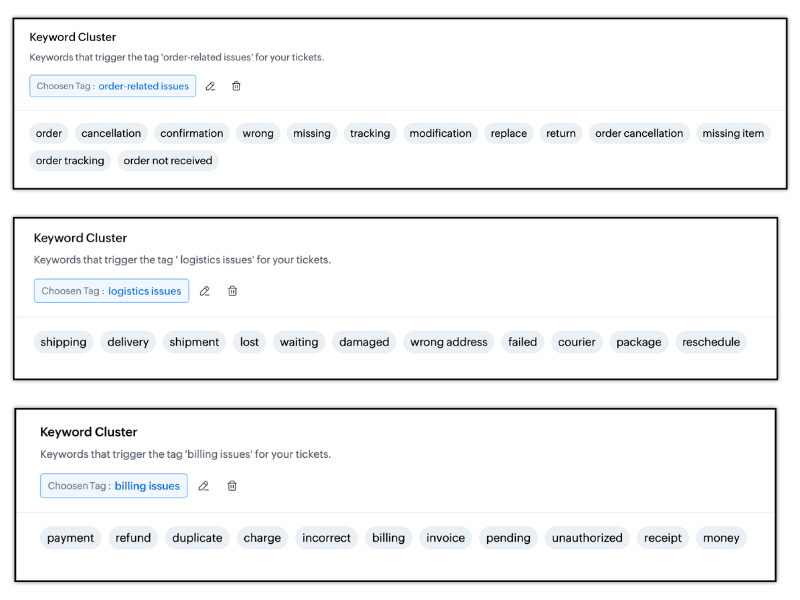
Based on the identified keyword cluster, Zia automatically tags the ticket as Billing issues, Order-related issues or Logistics issues.
Direct Assignment Rules to Route and Assign Tickets
Direct Assignment Rules move tickets to the appropriate department and assign them to a team or individual based on predefined criteria. When a ticket meets the specified conditions, it is automatically routed to the Billing, Logistics, or Orders department and assigned accordingly.
The criteria are based on tags and keywords found in the ticket's subject and description, helping ensure accurate ticket management.
For example:
- Route billing-related tickets: If a ticket has the tag Billing-related issue, move it to the Billing department and assign it to the Order Management team.
- Route order-related queries: If the ticket's subject or description contains the phrase "When will I receive my order?", the system identifies it as an order-related query based on the keyword order. The ticket is then routed to the Logistics department and assigned to John, the logistics supervisor.
Configuration
To configure Zia auto-tagging and keyword cluster
- Navigate to Setup > Zia > Intelligence.
- Select Customer Support department.
- Enable Ticket Auto Tags.
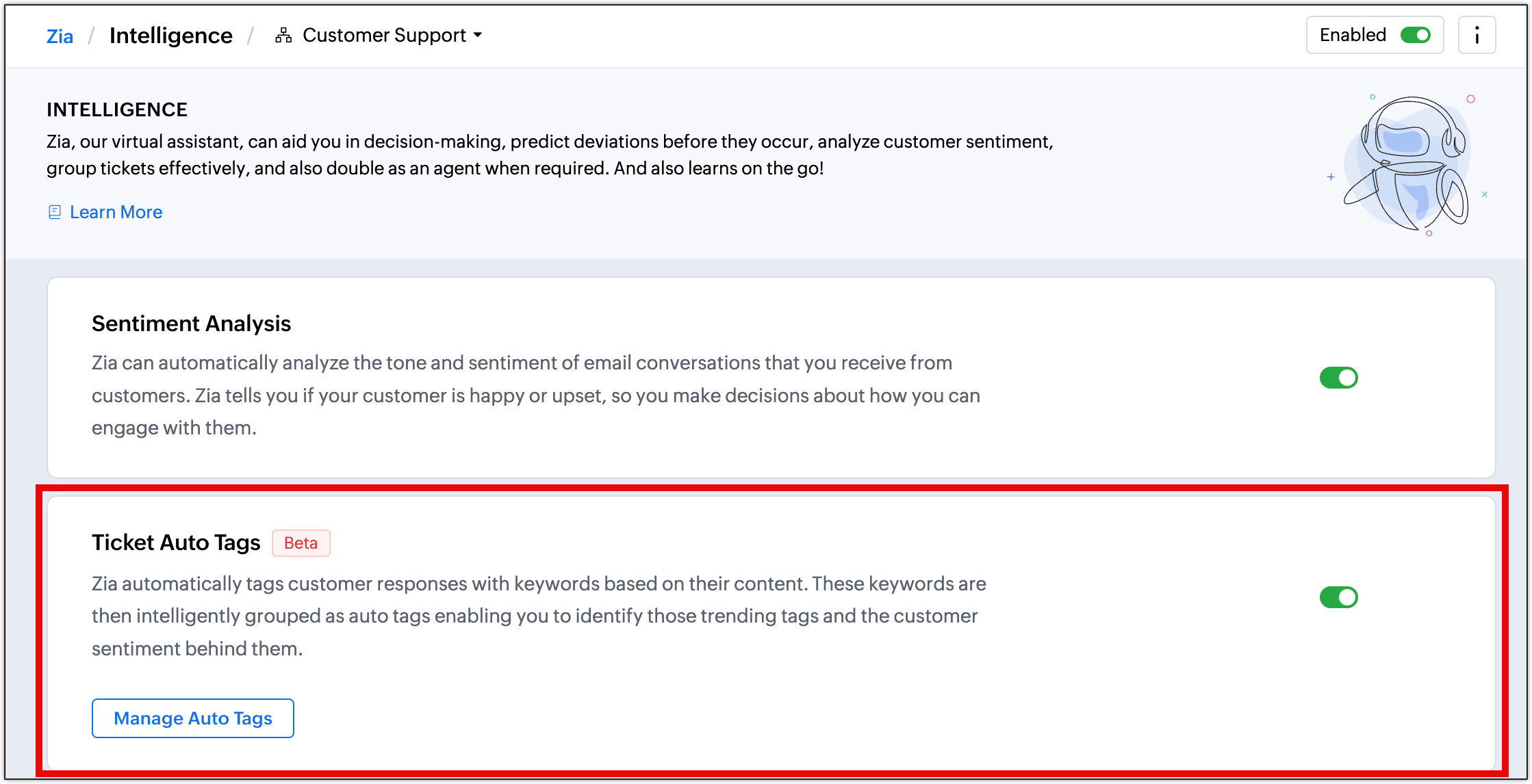
Once enabled, Zia analyzes the Customer support department's existing eligible tickets, identifies recurring keywords, and groups similar keywords into clusters. Zia generates a suitable tag for each keyword cluster.
When new tickets arrive, Zia matches their content against the learned keyword clusters and automatically assigns the corresponding tags.
To configure direct assignment rule
- Navigate to Setup > Automation > Assignment Rules > Direct Assignment.
- Click New Direct Assignment.
On the New Direct Assignment page, enter the following details:
• Rule Name: Routing tickets.
• Status: Active.
• Execute on: Ticket Create.
Click Add Target. In the Add target for this rule sub-page, configure the following values for billing-related tickets:
• Ticket coming to: Customer Support.
• Criteria:
◦ Subject - Contains - refund, refunded, money back, reimbursement, payment, chargeback, billing, invoice, duplicate charge, overcharged, unauthorized payment
◦ Description - Contains - refund, refunded, money back, reimbursement, payment, chargeback, billing, invoice, duplicate charge, overcharged, unauthorized payment
◦ Tag - is - billing-issues.
• Move tickets to: Billing.
• Assign ticket to: Payment Process Team.
• Click Save.
Click Add Target again and configure the following values for logistics-related tickets:
• Ticket coming to: Customer Support.
• Criteria:
◦ Subject - Contains - shipment, shipping, delivery, delayed delivery, late delivery, order not received, tracking, courier, package, lost package, damaged package, delivery address, reschedule
◦ Description - Contains - shipment, shipping, delivery, delayed delivery, late delivery, order not received, tracking, courier, package, lost package, damaged package, delivery address, reschedule
◦ Tag - is - logistics-issues.
• Move tickets to: Shipping.
• Assign ticket to: Package and Delivery Team.
• Click Save.
Click Add Target again and configure the following values for order-related tickets:
• Ticket coming to: Customer Support.
• Criteria:
◦ Subject - Contains - order, cancel order, order cancellation, order confirmation, order status, order modification, replacement, return, wrong item, missing item, product defect
◦ Description - Contains - order, cancel order, order cancellation, order confirmation, order status, order modification, replacement, return, wrong item, missing item, product defect
◦ Tag - is - order-related-issues.
• Move tickets to: Product order.
• Assign ticket to: Order Management Team.
• Click Save.
Output
Time spent on manually identifying, tagging, and routing tickets was reduced to zero.
Customers received faster first response reducing the first response time and CSAT.
Improved SLA alignment with better average handling time and quicker response time.
Streamlined communication with less number of junk or repetitive enquiries.
Read more:
- EditionExpress and above
- Key FeaturesDirect Assignment from Assignment Rules
- Profile PermissionHelpdesk Automation